Client Proofing Studio · Est. 2026

Client proofing,
done beautifully.

A calm, elegant home for client approval. Share galleries, collect favorites and comments, and close each project with a timestamped sign-off — without the clutter of generic tools.

Free while in beta · Invite-only for early studios

A stack of fine-art black-and-white photographic prints on a warm cream surface, with a vintage brass loupe resting on top, alongside a ruler, pen, espresso cup, and leather portfolio — an editorial photographer's proofing desk.
Your proofs, presented with the care they deserve.

How it works

Three steps, start to sign-off.

  1. 01

    Upload your gallery

    Drag in a folder of proofs. We render crisp thumbnails and a distraction-free full-size view — watermark-optional, with a passcode if you want one.

  2. 02

    Share a private link

    Your client sees a branded, password-protected gallery with your masthead — not ours. No accounts. No app downloads.

  3. 03

    Collect favorites & selections

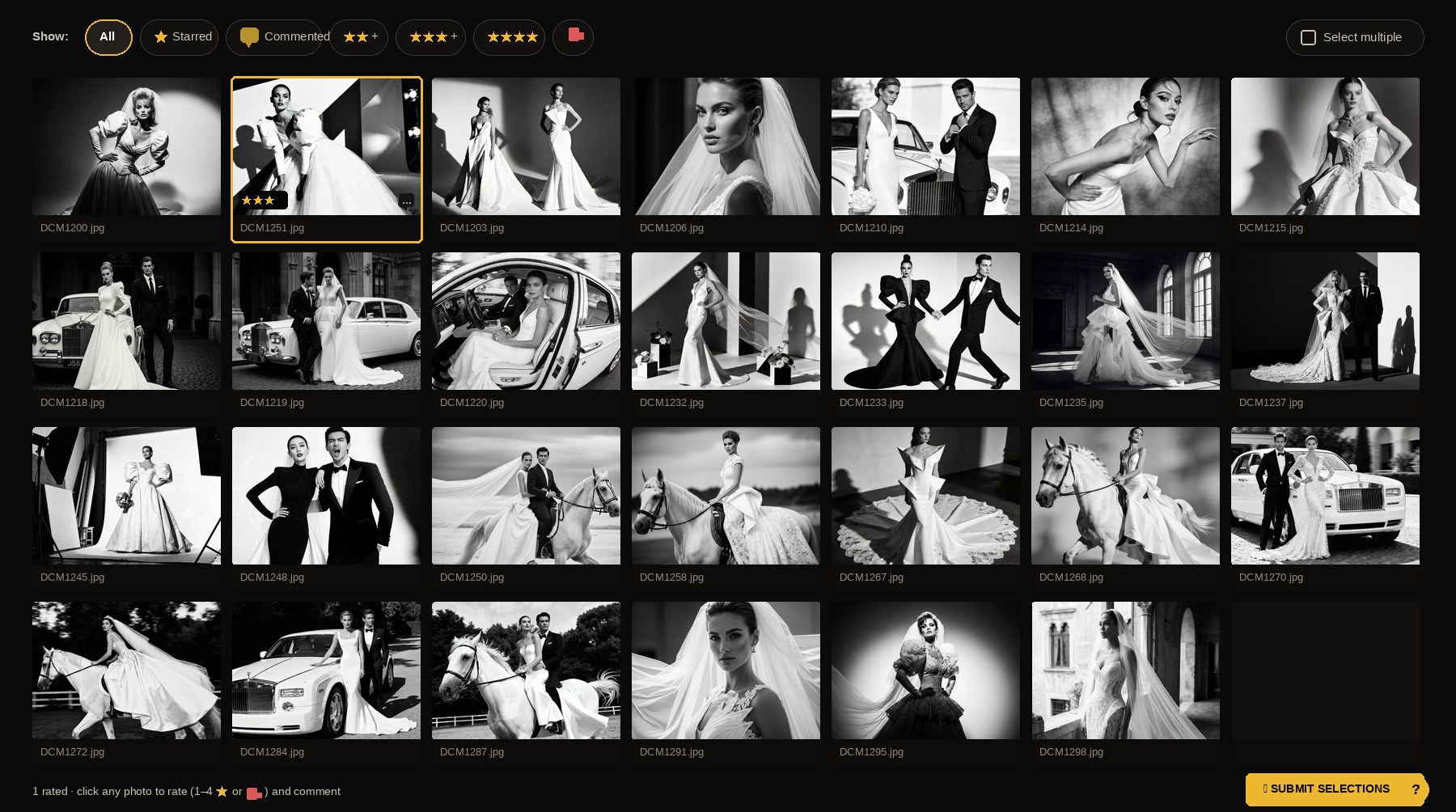
    Clients favorite, comment, and submit their picks. You get a single clean list — plus a timestamped contact-sheet PDF and a ZIP of the approved frames.

A photographer reviewing a grid of black-and-white portrait proofs on a monitor, with warm window light and ambient lamp glow.

Features

Built for the way you actually work.

  • Branded client experience

    Your logo and accent color on every gallery. Clients feel your studio, not our software.

  • Favorites & comments

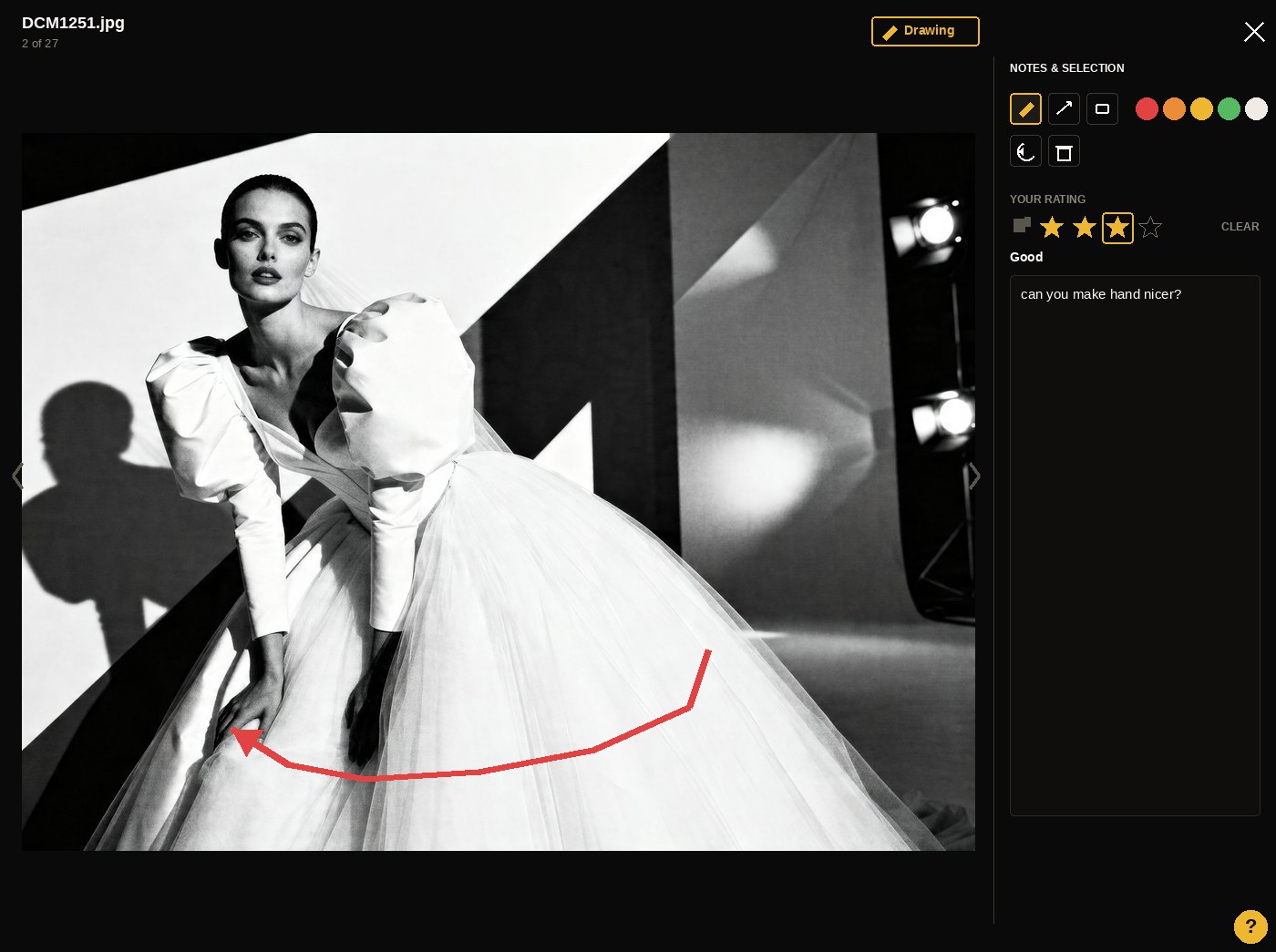
    Clients mark keepers with a tap and leave notes on individual frames — nothing gets lost in email.

  • Contact-sheet PDF

    Every submission generates a timestamped PDF of the client's picks and comments for your records.

  • Passcode-protected links

    Each gallery gets a private URL, with an optional passcode and expiry date — no client accounts required.

  • Approved ZIP export

    Once selections are in, download a single ZIP of just the approved frames and get to work.

  • Watermark on the fly

    Turn on a text watermark per project to deter screenshots before the client has committed.

A client proofing studio should feel like the rest of your studio — quiet, refined, considered.

The ProofingDesk ethos

Pricing

Free while we're in beta.

ProofingDesk is invite-only for a small group of early studios. We'll announce pricing before anything changes — and early members will get looked after.

Beta access

Early studio

Free while we're in beta

For the photographers helping us shape the product

  • Unlimited client galleries
  • 2 GB of photo & video storage
  • Favorites, comments & submissions
  • Contact-sheet PDF + approved-ZIP export
  • Passcode protection & link expiry
  • Your logo and accent color on every gallery
  • Direct line to the team for feedback
Request an account

FAQ

Questions, answered.

Do my clients need to create an account?

No. Clients open a private link, optionally with a passcode. No app, no signup — just a clean gallery.

What file types are supported?

JPEG and PNG images, plus GIF, WebP, and SVG. Video proofs in MP4, MOV, WebM, M4V, and Ogg.

You can also upload straight from your card in RAW — Canon (CR2, CR3), Nikon (NEF, NRW), Sony (ARW, SR2), Adobe (DNG), Fujifilm (RAF), Olympus (ORF), Panasonic (RW2), Pentax (PEF), and Samsung (SRW). On arrival we extract the camera's embedded full-size JPEG preview and store only that — your RAW never touches our disk. In practice a 40 MB CR2 becomes a ≈500 KB JPEG that's still plenty sharp for client review, so a full wedding card dump fits comfortably inside your quota. Each uploaded photo shows a small RAW badge in your dashboard; hover it to see the original RAW size next to the stored JPEG size.

Every upload — RAW or JPEG — gets a fast thumbnail and a 1600 px web preview generated automatically.

How much can I upload?

Every free account includes 2 GB of storage for your original photos and videos — plenty for dozens of client galleries. Individual files cap at 50 MB, and each upload batch at 500 MB. If you're approaching the limit, archive finished projects or reach out and we'll raise it.

How does client submission work?

Clients favorite the frames they want, leave comments if they like, and press Submit. You get an email notification, a contact-sheet PDF of their picks and notes, and a ZIP of the approved images — all with a timestamp on record.

Can I brand the gallery with my studio?

Yes. Set your logo and accent color in the dashboard and every client gallery picks them up automatically. Each project can also carry its own passcode, watermark, and expiry date.

Is ProofingDesk open to new studios?

We're currently in invite-only beta while we sand the edges with a small group of early photographers. Create an account and we'll be in touch.
Ready to give your clients
a studio-grade experience?

Create an account in under a minute. Your first gallery can be live in the time it takes to cull a wedding.

Free while in beta · Invite-only for early studios